Skip to content

Solution

One set of records for the whole practice.

Time, projects, billing, expenses, banking, payroll and the general ledger, built as one system with one set of approvals. Start with the parts you need; the rest is already underneath.

Instead of
  • Timesheet app
  • Project spreadsheet
  • Invoicing tool
  • Bookkeeping software
  • Month-end spreadsheet
One set of records
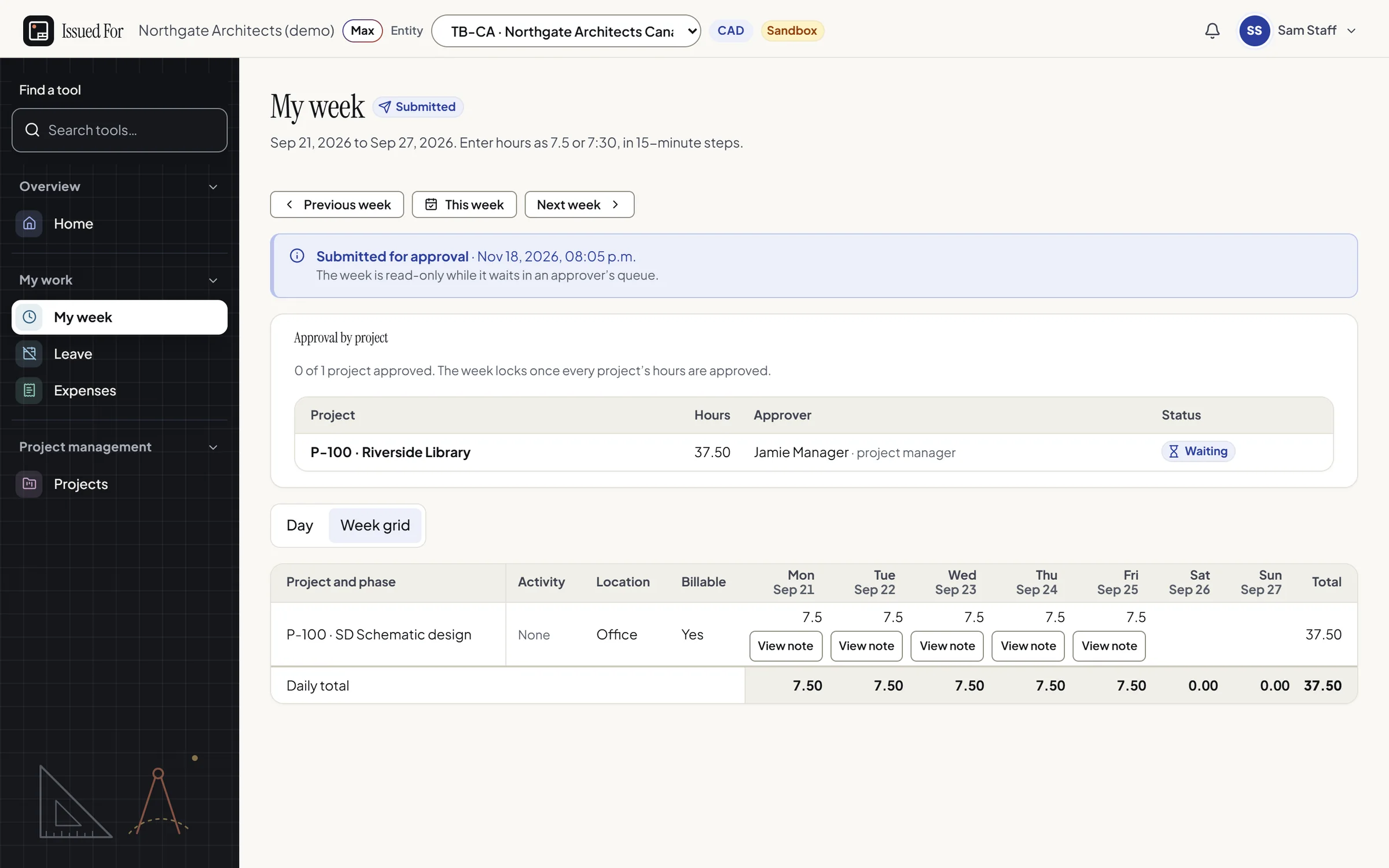
My week in Issued For: a submitted week with hours by project and phase for each day, waiting for the project manager's approval.
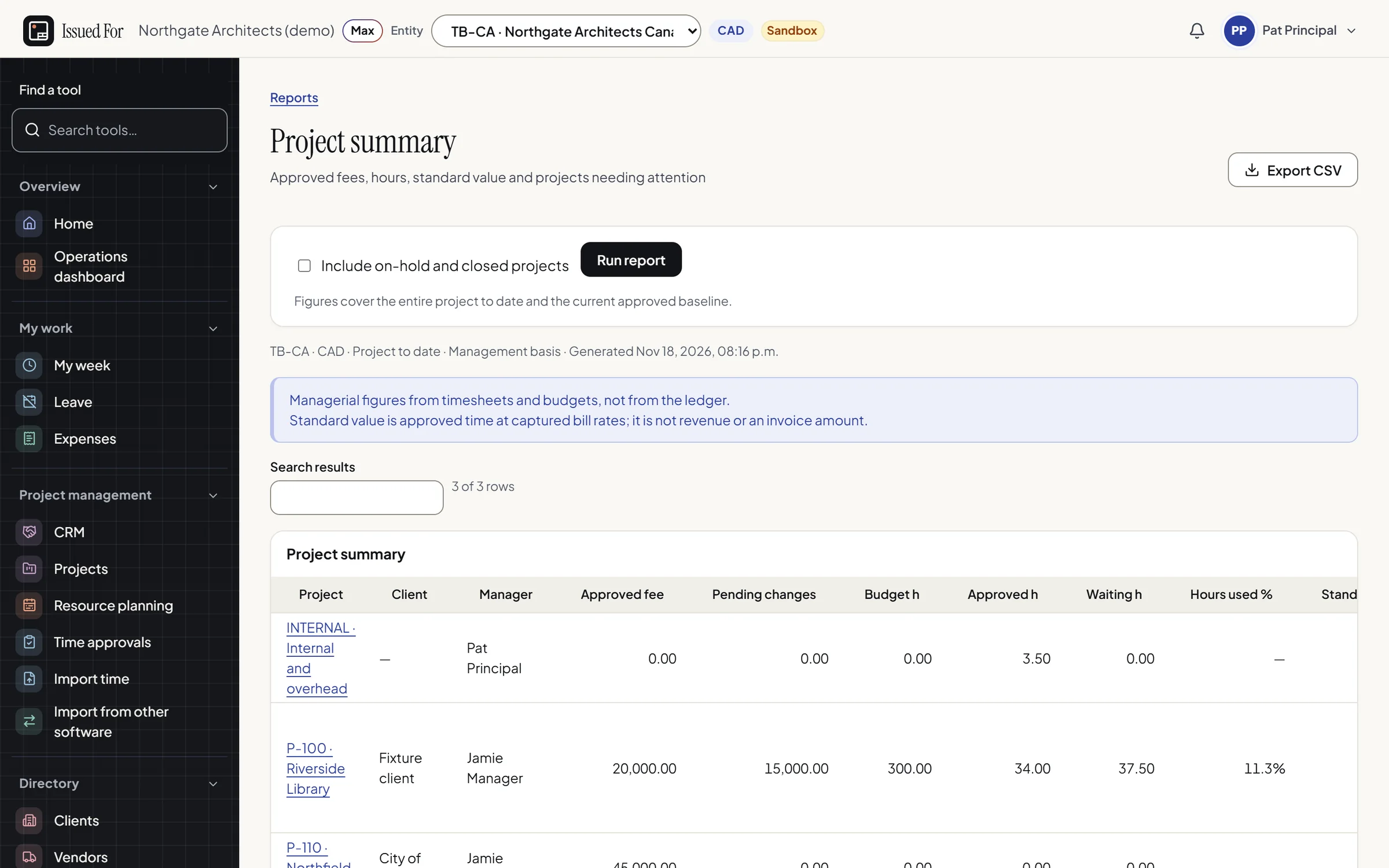
The project summary report in Issued For: approved fees, pending changes, budget and approved hours by project.

Time and people

A week of time without opening an accounting system.

Staff see their projects and phases, nothing else. Approvers see what changed and why.

Free

  • My week: a week grid on desktop and a day view on phones
  • Copy last week's rows, office or site, a work note for each day
  • Each project's manager approves that project's hours, or returns the week with a reason
  • CSV import that checks every row before anything is created
  • Staff, weekly capacity and holidays
  • Hours by person and project, and timesheet status

Projects and planning

Fees, budgets and change orders that hold their shape.

A proposed change can shape your forecast, but only an approved one raises the fee you can invoice.

Free and Pro

  • Projects with phases, and templates for the phases you always use
  • Contract fees and budget versions with approval
  • Change orders with proposed and approved values, decided by a principal
  • Signed contracts and amendments kept with each project
  • Weekly resource plans against holiday-adjusted capacity
  • Project summary, budget variance by phase, workload and utilization

Billing and receivables

Invoices that are reviewed before they leave the studio.

Rates are effective-dated, so approved time keeps the value it had when the work was done.

Pro

  • Clients, contacts and client categories
  • Rate tables by client category, personal and project rates, confidential cost rates
  • Client invoices with tax and project coding, reviewed and then posted
  • A printable client copy with your firm's details and tax registrations
  • Receipts, credits and deposits, with receivables aging and client statements
  • Invoices in CAD or USD at a rate you review

Expenses and receipts

Receipts read for you, taxes kept apart.

Text recognition runs on Issued For's own servers in English and French. You check what it proposes.

Pro

  • Expense reports from PDF scans and photos
  • Vendor, date, subtotal, each tax and total proposed, with unsure fields marked
  • GST/HST, PST and QST separated; recoverable tax claimed back
  • Approval by each project's manager, then posting and reimbursement
  • Billable expenses on invoices at cost plus your markup, by firm or by project

Bills, banking and payroll

Pay what you owe and prove what you paid.

Statements come in as files, so nothing depends on which bank you use.

Max

  • Vendor bills and payments, with 1099 preparation for US firms
  • Cheques on preprinted stock, numbers never reused, voids with a reason
  • Bank and card statements in CSV, OFX or QFX, matched before anything new is recorded
  • Reconciliations that keep their original balances and cleared items
  • Payroll runs from approved time and salaries, with stubs, cheques and payroll journals

Books, review and statements

A general ledger your accountant can sign off.

Every invoice, bill, expense and pay run posts through one ledger with independent approval.

Max

  • Journals with independent approval and reversals instead of edits
  • Accounting periods, close checks and accountant sign-off
  • Opening balances validated against your control accounts, posted once
  • Trial balance working paper with your map numbers and adjusting entries
  • General ledger, balance sheet and income statement, with CSV export
  • Canadian and US entities, each with its own books in CAD or USD

Who uses it

Each person sees the part of the practice they run.

Roles are permission presets, scoped by entity. Nobody sees salaries or bank details unless their role includes them.

Staff

Fill in a week, add receipts and see what came back and why.

Project managers

Approve their projects' hours and expenses and watch budgets by phase.

Principals

Decide change orders, approve invoices and see the firm's three numbers.

Office and finance

Bill clients, pay vendors, reconcile the bank and run payroll.

Your accountant

Review each period, propose adjustments and sign off, free of charge.

Straight answers

What Issued For does not do yet.

We would rather you hear it here than find out during setup.

  • Live bank feedsStatements are imported as CSV, OFX or QFX files. Direct connections may follow once they can be verified.
  • Statutory payroll and filingGovernment deductions, filings and direct deposit stay with your payroll provider; Issued For records the results.
  • Sales tax returnsGST/HST, PST, QST and US sales tax are tracked separately, but returns are filed outside Issued For.
  • Automatic invoices from timesheetsInvoices are prepared from approved time and fees today. Automatic invoice drafts are next on the roadmap.
  • Combined Canadian and US statementsEach entity keeps and reports its own books. Group consolidation is planned for a later release.
  • Self-service sign-upDuring the pilot we set up each firm and its members with you, rather than through an online form.

Issued for your review.

Issued For is in a controlled pilot with a small group of firms. Tell us about yours and we will set it up with you.

  • Free for teams of up to 3 people
  • We set up your firm with you
  • Nothing is billed until we confirm your plan with you